

AI Tools for Family Offices: What to Use for Each Job
Ask which job needs doing, which records the tool can reach, and who checks the result.
Which AI tools should a family office use for each job?
Family offices usually need more than one AI tool. Enterprise workspaces help staff research and draft, private-market platforms collect and extract investment documents, reporting systems calculate and present portfolio data, and a private archive can connect agreements, correspondence, notices, and historical records. Choose by job, permissions, source coverage, and review process rather than a universal ranking.
Start With the Job, Not the Model
A family office can buy a capable AI workspace and still fail to answer a basic record question. The model cannot cite an agreement it cannot access or reconcile a notice filed under the wrong entity.
Separate four jobs: research and drafting, document extraction, portfolio reporting, and private record intelligence. The choice depends on where records live and what decision follows the answer.
Commercial disclosure: Sovereign Layer publishes this comparison and intends to sell private archive and record-intelligence services. Vendor descriptions come from official documentation reviewed October 24, 2026. They are not claims of hands-on testing or suitability for every office.
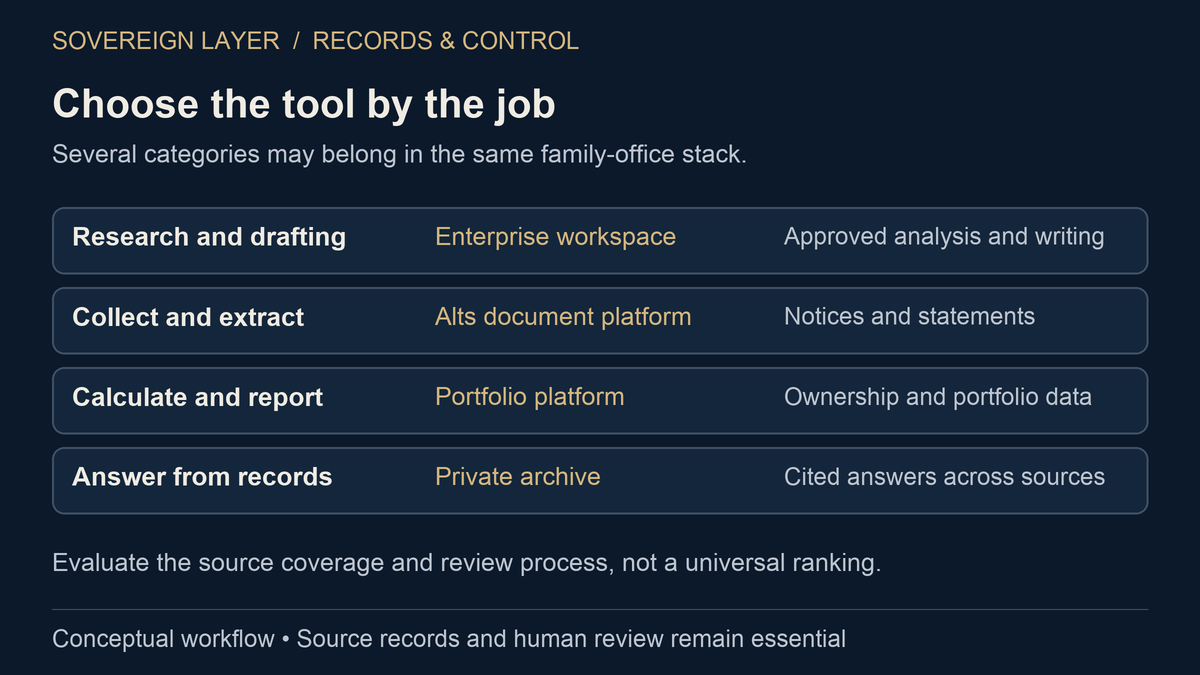
A Job-Based Shortlist
| Job | Example to evaluate | Good fit when | What to verify |
|---|---|---|---|
| Enterprise research and drafting | ChatGPT Enterprise or Microsoft Copilot | Staff need a managed workspace for analysis, writing, and work with approved internal sources | Connected-source permissions, retention, audit access, web-search handling, and human review |
| Alternative-investment document collection and extraction | Canoe Intelligence | The office needs capital calls, distribution notices, statements, and other alts records collected and normalized | Portal coverage, exception handling, supported documents, delivery into current systems, and the boundary beyond alternatives |
| Portfolio aggregation and reporting | Addepar | The office needs multi-custodial aggregation, entity-aware reporting, and portfolio analytics | Data feeds, calculation methods, ownership mapping, implementation work, and treatment of unstructured historical records |
| Private archive and cited record answers | Sovereign Layer | The office needs agreements, notices, correspondence, and broader estate records connected in a client-controlled system | Deployment boundary, supported sources, citation quality, permissions, ongoing stewardship, and which monitoring functions are live |
1. Enterprise AI Workspaces for Research and Drafting
ChatGPT Enterprise and Microsoft Copilot are sensible candidates for staff who need help summarizing approved files, preparing questions, drafting correspondence, or analyzing a spreadsheet. OpenAI says ChatGPT Enterprise data is not used to train its models by default, offers workspace access controls, and lets enterprise administrators control retention. OpenAI's enterprise privacy documentation also explains that connected apps respect existing application permissions.
Microsoft says Copilot works inside the Microsoft 365 service boundary and only accesses data the signed-in user is authorized to see. Its enterprise data protection documentation also notes that web queries have different handling from Microsoft Graph data.
Neither product automatically repairs overshared folders, inconsistent entity names, or an incomplete archive. If permissions are messy before deployment, AI can make the mess easier to search. Review access before connecting private records.
2. Private-Market Collection and Extraction
Canoe Intelligence is built around alternative-investment documents. Its official product pages describe collection from GP portals and inboxes, tracking for missing documents, and extraction from records such as capital calls, distributions, and partner capital statements. Canoe Connect documentation also describes exception review and document-receipt dashboards.
That is a specific and valuable job. It is different from asking questions across the office's full historical record. Before buying, list the document types and portals that matter, then test representative exceptions. Ask where normalized data goes, how the office corrects errors, and whether records outside alternative investments belong in another system.
3. Portfolio Reporting and Analytics
Addepar positions its family-office platform around portfolio aggregation, ownership structures, performance analysis, and permissioned reporting. Its family-office product documentation describes multi-custodial data, look-through ownership, and public-and-private portfolio analysis.
A reporting platform should remain the system for calculations it is designed to perform. A document-intelligence layer should not quietly substitute a language-model answer for an accounting or performance calculation. The useful connection is from source record to structured data to reviewed report, with a clear owner at each step.
4. Private Archive and Record Intelligence
A private archive serves a broader record question: What do the office's own documents say, and which sources support the answer? That can include investment agreements, capital-call notices, wire confirmations, tax records, trusts, property files, and correspondence.
Sovereign Layer is being developed for that job. Its current working foundation is indexed records and cited retrieval. Connected intake, monitoring, and scheduled reporting remain product direction rather than finished proof across every workflow. See the illustrative cited-answer example, then review the document-management options by job.
How to Run a Useful Evaluation
- Pick three real tasks. Use a routine request, an exception, and a historical question.
- Define the records. Name the sources needed for each answer.
- Test permissions. Confirm users cannot retrieve restricted material.
- Check evidence. Require citations or a trace to the source system.
- Assign review. Name who confirms financial, legal, tax, and investment conclusions.
- Count the work. Include cleanup, integrations, corrections, governance, and upkeep.
The right stack covers the jobs without blurring responsibility. Compare deployment and stewardship choices and private AI with ChatGPT Enterprise.
Common questions
Does a family office need a private AI system?
Not for every task. A managed enterprise workspace may be enough for approved research and drafting. A private system becomes more relevant when the job depends on sensitive historical records, client-controlled deployment, custom permissions, or cited answers across sources.
Can one AI tool replace document management and portfolio reporting?
Usually not without trade-offs. Storage, extraction, calculations, reporting, and cited record retrieval are different jobs. Treat integration as a design question and keep each system's responsibility explicit.
Sources and further reading
Sovereign Layer develops private AI for family offices. Will Scott designed the approach around firsthand investment experience and the need to keep private records under client control. Comparisons explain fit by task; they are not independent product rankings.
Book a Private Demo
Bring one record question and the systems that should answer it. We can map the sources, controls, and review work before discussing a private deployment.
Book a Private Demo