

Private AI for Family Offices
Private AI gives a family office practical control over where records go, who can use them, which models are allowed, and what software may do.
What is private AI for a family office, and how should an office choose a deployment?
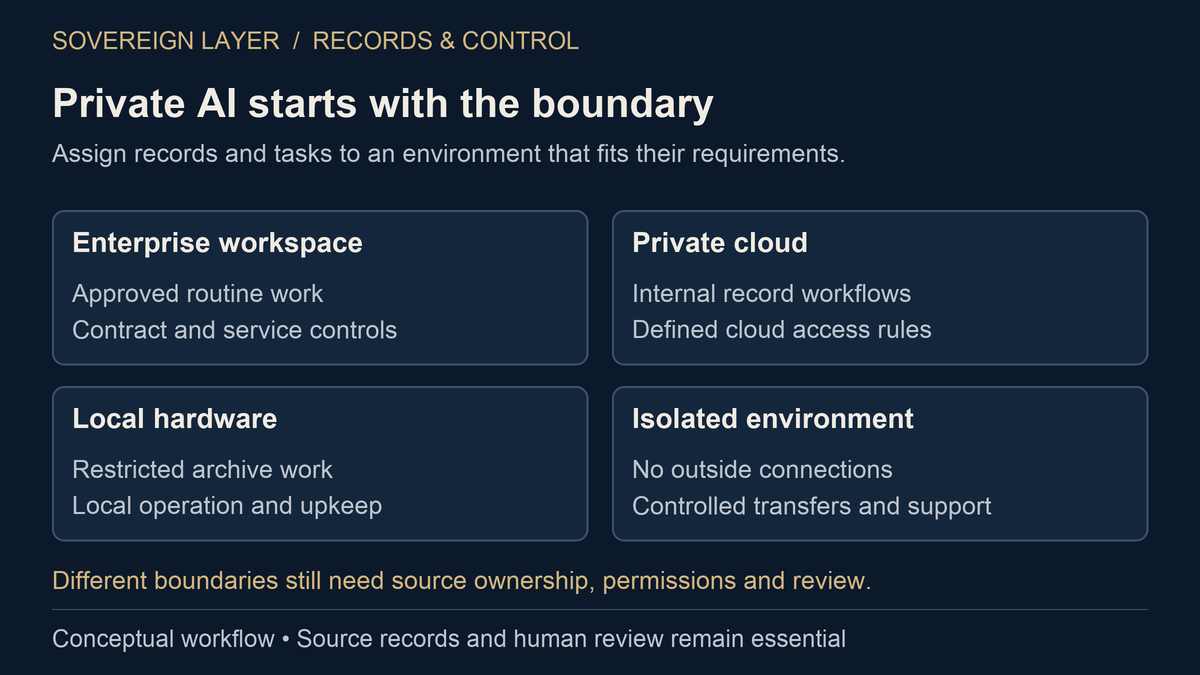
Private AI for a family office is a set of technical and operating choices, not one product. The office assigns different rules to different records, people, models, and tasks. It may combine an enterprise workspace for routine drafting, a private cloud for internal records, local hardware for restricted archives, and an isolated environment for material that cannot connect to outside services.
What does an answer with sources look like?
A practical question brings several records together. Open the fictional excerpts below to see the difference between what a notice requests, what a payment record confirms and what an agreement establishes.
When was the latest capital call for Harbor Lane?
The latest notice in this example is dated 10 June 2026 for $150,0001. A payment confirmation records the contribution on 18 June2. The agreement states a $1 million commitment3.
1. Capital-call notice
Fictional notice: Harbor Lane LLC. Issued 10 June 2026. Requested contribution: $150,000. Payment due: 30 June 2026.
2. Payment confirmation
Fictional confirmation: payment of $150,000 to Harbor Lane LLC recorded on 18 June 2026. A reviewer would still check the actual bank record.
3. Governing agreement
Fictional agreement: the investor’s total commitment is $1 million. Other calls and distributions would be needed to establish the remaining obligation.
Fictional records and figures illustrate the workflow. This is not client data or a measured product result. A person checks the documents before acting.
What Does Private AI Mean in Practice?
Private AI describes a boundary around data and authority. The boundary can be contractual, technical, physical, or a combination. OpenAI, for example, says it does not train on business data by default and gives ChatGPT Enterprise administrators retention and access controls. A family office may decide those controls fit routine research while reserving restricted records for a different environment.
| Deployment | Useful for | Trade-off |
|---|---|---|
| Managed enterprise AI | Approved research, drafting, and analysis | Fast adoption; provider defines the product boundary |
| Dedicated private cloud | Custom retrieval and connections to internal records | More control; more security and vendor work |
| On-premises AI | Records kept on office-controlled hardware | Office or steward must patch, test, back up, and support it |
| Isolated environment | A small set of records with no outside connection | Live research, integrations, and updates become harder |
The word private cannot replace access reviews, logs, backups, incident response, or a tested exit. The private AI and ChatGPT Enterprise comparison applies these distinctions to one common buy decision.
Which Parts Make a Private AI System Usable?
Six parts have to work together. Start with the records, not the model. Give each document set, database, and research source an owner, purpose, sensitivity level, and access rule.
- Records and systems. Map where the source files live and which copy is authoritative.
- People and access. Match permissions to principals, employees, counsel, advisers, heirs, and temporary duties.
- Sources beside answers. Return citations with an answer so a reviewer can open the supporting record.
- Approved models. Route work only to allowed local or hosted models and document how to replace them.
- Limits on actions. Require human approval before software changes money, permissions, records, or communications.
- Logs and an exit. Keep the settings, tests, backups, and handoff notes needed to review or move the system.
This records-first design supports jobs such as answering estate questions from source material, reviewing a capital call against its governing records, or checking a private investment update. Sovereign Layer is intended to organize a private archive and produce cited intelligence from it while keeping the archive under the client’s control.
Where Should a Family Office Begin?
Begin with a useful job that a named person can inspect. Searching approved agreements, preparing a cited briefing, or identifying which expected records are missing creates an observable test. A broad promise to make the whole office intelligent does not.
- Inventory the records. Record owners, locations, sensitivity, retention, and jurisdiction.
- Define the question. Name the input, expected output, reviewer, and prohibited actions.
- Choose the boundary. Decide which outside services may receive which data.
- Test failure. Check permissions, citation accuracy, conflicting sources, logs, and containment.
- Plan the exit. Document how data, settings, prompts, and operating knowledge can move.
Use the family office AI governance framework to assign accountability. Then test the architecture against the private-wealth AI threat model. Will Scott designed Sovereign Layer from his own experience managing investments across multiple providers and trying to understand the whole estate from scattered records.
Common questions
Does private AI require an on-premises model?
No. Private AI can use local models, dedicated cloud resources, approved hosted models, or a combination. The office should know where each class of data goes and who can reach it.
Is an air-gapped system always safer?
No. Isolation reduces outside connections but makes updates and integrations harder. Physical access, internal permissions, backups, logs, and staff practices still matter.
How does a family office avoid model lock-in?
Keep records, permissions, retrieval logic, tests, and audit history outside one model. Test a replacement before a change becomes urgent.
Sources and further reading
Sovereign Layer develops private AI for family offices. Will Scott designed the approach around firsthand investment experience and the need to keep private records under client control. Comparisons explain fit by task; they are not independent product rankings.
Book a Private Demo
Bring one workflow and a description of the records it depends on. Please do not send sensitive files through the website.
Book a Private Demo